
WIVB News 4
Nexstar Inc.News & Magazines
3.7545.00 Reviews
- Version
- 510.0.1
- Installs
- 100.00K
- Age Rating
- Everyone
Screenshots
Our Review of WIVB News 4
 Analysis by Appyee
I look at local news apps differently from general news readers. A national app can help me understand a major story, but it may not tell me what is happening close to home when weather changes quickly or a local event affects my routine. WIVB News 4 is built for that narrower, more practical job. It is a free News & Magazines app from Nexstar Inc., centered on the WIVB News 4 brand and its mix of regional reporting, weather information, and news updates.
My overall impression is that it makes the most sense as a local information companion rather than as my only news source. It gives me a direct route to the station’s coverage, which is useful when I want nearby headlines without sorting through a large national feed. At the same time, the experience depends on whether the station’s style, story selection, and update rhythm match what I want from a news app. The main value here is local focus, not endless breadth.
What the app is really for
WIVB News 4 has been available since December 12, 2012, and its current version is 510.0.1. The long presence on mobile suggests that this is not a novelty app made for a single news cycle. It is a companion to an established local television-news operation, and that shapes how I use it: I open it for regional developments, weather checks, and stories that matter because they are nearby.
The store summary emphasizes more news and more weather, and that describes the practical reason to install it. I would not choose this app when I want a broad international briefing, deep specialist reporting, or a carefully organized archive of every topic I follow. I would choose it when local relevance matters more than having the widest possible selection of sources.
The audience is fairly clear. Residents who follow WIVB News 4, people who have recently moved into the station’s coverage area, and anyone who wants a quick local check can all find a sensible use for it. It can also suit a person who prefers getting updates from a familiar regional newsroom instead of relying entirely on social feeds, where context and source identity can be less obvious.
It is less convincing for someone who already has a preferred national news reader and only wants occasional local headlines. Installing another app may add clutter without changing that person’s routine. The same is true for readers who expect extensive personalization, a large range of independent publications, or a single place to manage every local area they care about.
How I would use it during an ordinary day
Imagine I am leaving for work and notice that the weather looks uncertain. I can use the app as a quick local check before deciding whether to change my plans. Later, if I hear about a road problem, severe weather situation, public safety event, or other regional story, I can return to the same source for an update rather than depending on a short social-media post.
That workflow is more useful than simply opening the app once and scrolling without a purpose. I would treat it as a short morning scan, a weather check before travel, and a way to revisit a developing local story. The trade-off is that a station-focused app may not provide the same range of viewpoints as a general news aggregator, so I would use another source when I need wider context or comparison.
Trust starts with knowing what you are opening
Trust is easier for me when an app has a clear identity. Here, the connection to WIVB News 4 and Nexstar Inc. is visible rather than hidden behind a vague publisher name. That matters because local news is often consumed quickly, and I want to know which newsroom is responsible for the reporting before I treat a headline as useful background for a decision.
The app has an average rating of 3.7 from around 1.3 thousand ratings, with 545 written reviews. I read those figures as a mixed but meaningful signal: enough people have used it to form a recognizable public opinion, while the score does not suggest that every user finds the experience flawless. Ratings cannot tell me whether a particular story is accurate or whether the app fits my phone, but they do encourage realistic expectations rather than blind enthusiasm.
Its 100K+ installs also place it in the category of a known local-news product rather than an obscure experiment. That does not automatically make it better, but it does make the app easier to place: it is designed for a defined regional audience and has attracted a substantial user base for that purpose.
Controls and choices I would check first
When I install any news app, I do not immediately enable every prompt. I first look at the notification request and decide whether I want urgent interruptions or only a quieter, manual reading habit. News alerts can be helpful during fast-moving weather or public safety situations, but too many alerts can make me ignore the important ones. My preference would be to begin conservatively and adjust only after seeing how often the app asks for attention.
I would also review the operating system’s app permissions rather than assuming that every request is necessary. The app supports Android 7.0 and later, so it is compatible with a wide range of Android devices, including older phones that may have limited storage or slower performance. On such a phone, I would pay attention to battery behavior, notification frequency, and how quickly pages load over mobile data.
Those checks are not proof of a particular data practice, and I would not treat a permission screen as a complete privacy policy. They are simply sensible user controls. If a permission does not make sense for the way I plan to use the app, I would leave it disabled unless the app clearly explains why it is needed for a feature I actually want.
The same principle applies to account access. I would avoid creating an account merely out of habit. If the app lets me read its core news and weather content without signing in, that would be the simpler route for my needs. If a future feature requires an account, I would want to understand what that account adds, what information it asks for, and whether I can still use the basic news experience without it.
Where data sensitivity matters in real use
News applications can feel harmless because the main activity is reading. However, the moments around reading deserve attention. A weather check may become location-sensitive if the app asks to identify where I am. A notification may reveal the kind of story I follow to anyone who can see my lock screen. A saved preference or account setting may create a more detailed picture of my interests than a single article view would.
For that reason, I would keep location access off unless a clearly explained local feature genuinely depends on it. I can still choose a local-news app because of its regional coverage without allowing automatic location access. If I travel outside the station’s main area, I would not expect the app to become a complete replacement for local sources in every place I visit.
I would also review lock-screen notification settings. A headline about a sensitive event can appear at an inconvenient time or in front of other people. Turning off detailed previews while keeping general alerts is a useful compromise when I want timely awareness without exposing every headline.
Mobile data is another small but practical consideration. Video-heavy news pages, repeated refreshing, or frequent alerts can consume more data than a quick text scan. I would use Wi-Fi for longer sessions and avoid repeatedly refreshing a developing story unless I am actively following it. This is not a criticism unique to WIVB News 4; it is a sensible boundary for any media app, especially on a limited plan.
What user agency looks like here
For me, a trustworthy news app is not one that makes every decision automatically. It is one that lets me choose how much of the experience enters my day. With WIVB News 4, I would build a routine around deliberate visits rather than allowing the app to become a constant stream of interruptions. I would decide which notifications deserve immediate attention, which can wait, and whether the app belongs on my home screen or in a less prominent folder.
I would also keep editorial judgment separate from app convenience. A local headline can be valuable because it identifies an issue near me, but I would still read beyond the headline before acting on it. For major events, I would compare the report with official local information or another reputable newsroom. That is especially important when weather, travel, health, or public safety is involved.
The app’s free price lowers the barrier to trying it, and its Everyone content rating makes it suitable for a broad household audience. I still would not hand the phone to a child and assume every headline is appropriate for every moment, because news can cover difficult subjects even when an app carries a general audience rating. The rating is useful context, not a substitute for supervision or personal judgment.
Because the app is associated with a television-news brand, I would expect the strongest reason to use it to be familiarity and local relevance. If I already watch WIVB News 4 or recognize its regional coverage, the app can make that relationship more convenient. If I do not know the brand, I would spend a few days checking whether the stories actually match my area and interests before making it part of my daily routine.
How it compares with the usual alternatives
A general news aggregator usually wins on variety. It can combine national, international, business, technology, and local stories in one feed, often with stronger topic controls. I would choose that kind of app when I want a broad briefing or enjoy comparing several publications. WIVB News 4 is more focused, so its advantage is reducing the distance between me and regional coverage rather than maximizing the number of sources.
Social media is faster for discovering that something is happening, but it can be noisier and less dependable as a first stop. Posts may be incomplete, reposted without context, or difficult to trace back to a responsible newsroom. A station app gives me a more recognizable editorial home. The trade-off is that I may see fewer personal perspectives and less of the informal conversation that social platforms provide.
A television broadcast can offer live presentation and visual explanation, while the app is more convenient when I cannot sit down to watch. I can check it during a short break or while preparing to leave home. On the other hand, a broadcast may be easier for understanding a complicated story through video, interviews, and on-screen maps. I see the app and the broadcast as complementary rather than interchangeable.
A web browser is the most flexible alternative because it requires no dedicated installation and can reach many sources. The app’s benefit is convenience: it keeps the WIVB News 4 experience close at hand and makes a repeated local-news routine easier. If I am trying to minimize apps, the website route may be preferable. If I want a quick, familiar local check, the dedicated app is the more natural choice.
Practical habits that improve the experience
My first tip would be to separate urgent information from background reading. I would allow only the alerts I genuinely want, then open the app intentionally for the rest. This prevents a local-news tool from turning into a constant distraction and makes important notifications easier to notice.
My second tip would be to use the app as a starting point during developing events, not as the only authority. For a storm, road closure, emergency, or public announcement, I would check the report and then look for the relevant official source before making a consequential decision. The app can help me discover the issue quickly, while official channels may provide the operational details I need.
My third tip would be to test it under the conditions in which I will actually depend on it. I would try a quick check on mobile data, open it during a busy morning, and see whether the notification behavior fits my routine. A news app can look excellent during a relaxed first session but become irritating if it loads slowly, interrupts too often, or demands more attention than I want.
Finally, I would revisit permissions and notification settings after using it for a few days. My initial choices are not permanent. If I never use a location-related function, I would keep location access disabled. If alerts are too frequent, I would reduce them. If I find that I miss important updates with everything muted, I would add back only the categories that have clear value to me.
Who should install it, and who should skip it
I would recommend trying WIVB News 4 if local reporting and weather are the main reasons I open a news app. It is especially suitable for readers who want a direct connection to a familiar regional newsroom, prefer a free app, and are comfortable managing notifications and permissions themselves.
I would be more cautious about recommending it to someone who wants a single app for worldwide coverage, detailed topic customization, or a wide range of competing viewpoints. That reader may be happier with a broader news reader and use local sources only when a specific story requires them. I would also skip it if I already have a browser-based routine that is faster and less distracting for me.
The current version, 510.0.1, supports Android 7.0 and later, which makes it accessible to many Android users. Still, compatibility is not the same as a perfect experience on every device. Older hardware, restricted data plans, or aggressive battery-saving settings can change how comfortable a media app feels in daily use, so I would judge it on my own phone rather than relying only on the version requirement.
My cautious verdict
WIVB News 4 is a sensible local-news choice when proximity matters more than variety. I like the clear regional purpose, the free access, and the option to make it part of a practical routine around local headlines and weather. Its public rating of 3.7 shows that the experience is not universally loved, so I would approach it as a useful tool to test rather than an automatic replacement for every other source.
My trust in using it would come from active choices: checking permissions, limiting lock-screen details, controlling alerts, and comparing important reports with official information. I would not infer more about its data practices than the app and operating system visibly explain, and I would not create an account unless the benefit were clear to me.
In the end, I would install it if I lived in or regularly followed the WIVB News 4 coverage area and wanted a convenient local check on my phone. I would keep a broader news source alongside it for national and international context. Used that way, it fills a specific gap well: it brings nearby news and weather closer without pretending to be the entire news world.
The app is free, carries an Everyone age rating, and has passed the basic test of remaining available across many Android generations. Those details make trying it easy. Whether it stays installed would depend on the quality of my everyday routine: useful alerts, relevant local stories, manageable data and battery behavior, and enough control over what reaches me. If those conditions fit, WIVB News 4 can earn a place as a focused regional companion rather than another noisy app on my phone.
Verdict
Strengths of WIVB News 4
- Fast access to breaking news and local headlines
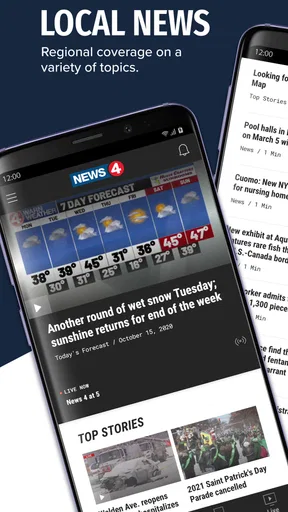
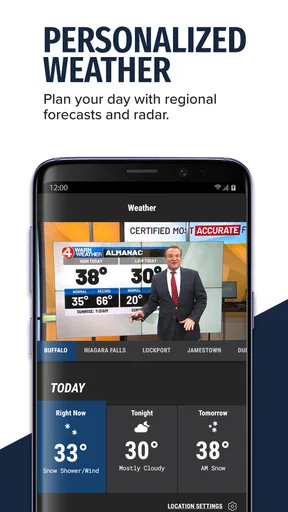
- Live weather updates help with daily planning
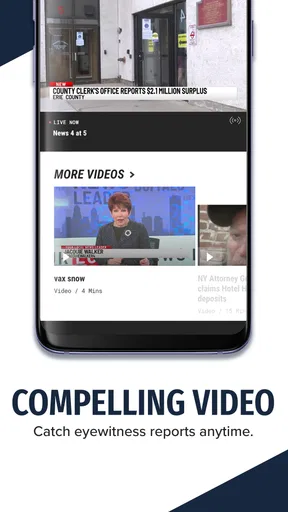
- Video reports add context beyond written articles
- Covers Buffalo and Western New York communities
- Push alerts can keep users informed during major events
Limitations of WIVB News 4
- Some alerts may feel frequent or overly urgent
- Coverage is mainly regional, limiting wider news value
- Video and live content can use substantial mobile data
- Advertising may make some screens feel cluttered
- App performance can depend on connection quality
Other Releases by Nexstar Inc.
View All
WGN-TV
News & Magazines3.3

KTLA 5 News Los Angeles
News & Magazines3.1

NewsNation
News & Magazines3.3

Arkansas Storm Team
Weather4.4
Similar Picks in This Category
View All
Google News - Daily Headlines
Google LLC4.0

X
X Corp.4.8

Flipboard:Your Social Magazine
Flipboard3.4

Opera News: breaking & local
Opera4.5

Hindi News by Dainik Bhaskar
Dainik Bhaskar Group4.0

Way2News Daily News App
Way2News ( Formerly Way2SMS )4.6
Frequently Asked Questions
What is the WIVB News 4 app?
WIVB News 4 is the mobile news application from Buffalo, New York’s News 4 team. It provides access to local and regional reporting, breaking news alerts, weather forecasts, live updates, sports coverage, traffic information, and other stories relevant to Western New York. The app is designed for readers who want convenient access to WIVB’s coverage from an Android or iOS device.
What type of news and information can I find in WIVB News 4?
The app typically includes local news from Buffalo and surrounding communities, national and international headlines, weather forecasts and severe-weather updates, sports reports, traffic information, investigative stories, and lifestyle content. Available sections and stories may change throughout the day as the newsroom publishes new reports. Coverage can also vary depending on your location and current events.
Does WIVB News 4 provide breaking news alerts and weather notifications?
Yes, WIVB News 4 may send push notifications for important breaking stories, severe weather, school or public-safety updates, and other urgent developments. Notifications require permission on your device, and you can usually manage them through the app or your phone’s settings. If you prefer fewer interruptions, review the available alert categories and disable notifications that are not useful to you.
Is WIVB News 4 free to download and use?
The WIVB News 4 app is generally available to download at no cost, allowing users to browse many news stories, forecasts, videos, and updates. However, some content may be affected by advertising, account requirements, subscription policies, or access limits that can change over time. Before downloading, check the current Google Play Store or Apple App Store listing for the latest pricing and access details.
Does the WIVB News 4 app include live video, streaming, or personalized features?
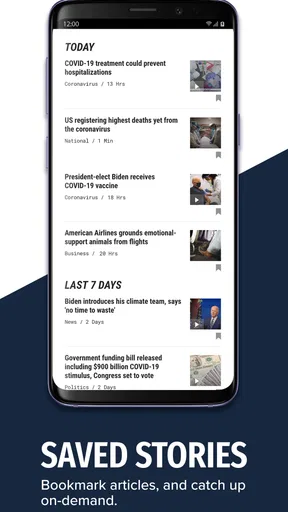
Depending on the current version and your location, WIVB News 4 may offer live newscasts, video reports, weather broadcasts, news clips, saved stories, and personalized notification options. Features can differ between Android and iOS and may depend on licensing or regional availability. A stable internet connection is recommended for streaming, while mobile data usage may increase when watching live or recorded video.
